DeepSeek Harness: an open agent harness, now with desktop apps
DeepSeek Harness is an MIT-licensed agent app built so that everything is a plugin. What the preview offers, what its safety notice says, and our take.
In this article
DeepSeek is pushing its agent app beyond the terminal. The DeepSeek Harness page now offers installers for macOS on Apple silicon and 64-bit Windows, and describes the project as “in public preview worldwide and open source, with composable plugins that extend what agents can do.” This article covers what Harness is, what the current preview adds, what its own safety notice says, and how we read it. We read the official page, the repository and its release notes; we did not install or run it.
What it is
DeepSeek Harness (dsh) is an open-source agent harness from DeepSeek, licensed MIT. The page pitches it for everyday work (organizing files, analyzing data, drafting documents and slides), coding (exploring repositories, fixing bugs, running tests), research with sources, and background tasks. The demo on the page uses DeepSeek-V4.1-Flash as the model.
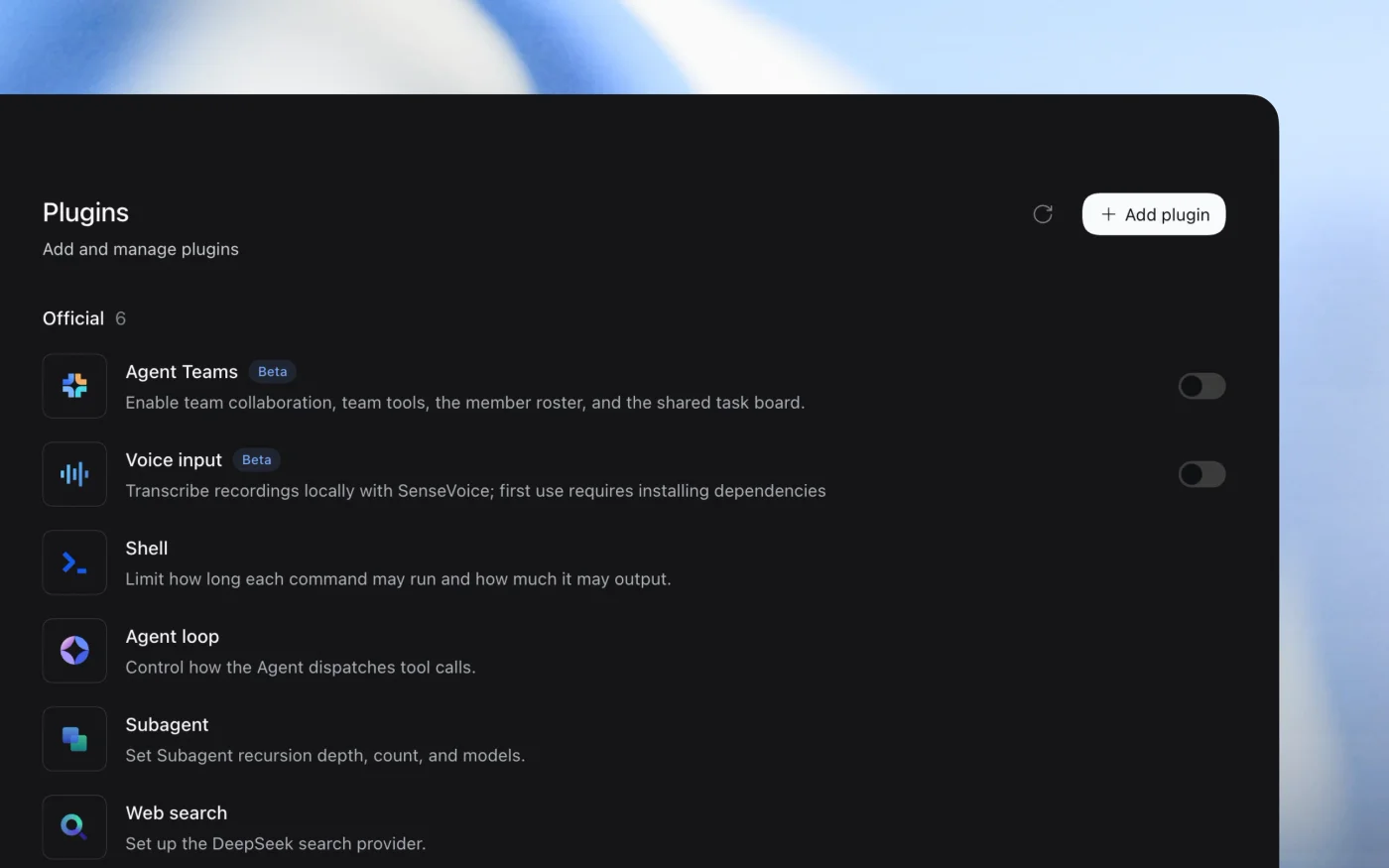
The design idea is in the README’s subtitle: everything is a plugin. Harness is built on Cordis, a framework whose design is described in an arXiv paper on “spatiotemporal composability”. Tools, skills and even interface elements are plugins. The official plugin list includes Agent Teams and Voice input (both beta), Shell (limits on how long a command runs and how much it outputs), Agent loop (how tool calls are dispatched), Subagent (recursion depth, count and models) and Web search. The page also lists experimental plugins for scheduled tasks and auto-approval review.
The most distinctive feature is Creator mode: you describe a plugin in chat and the agent writes, installs and checks it. The page’s example builds a floating Pomodoro timer, loading a plugin-development skill, writing the files and installing the bundle.
Ways to run it
- Desktop: installers for macOS (Apple silicon) and Windows (64-bit) from the official page.
- Web UI:
npx @deepseek-ai/dsh webstarts a local interface, by default at127.0.0.1:3080. - From source: clone the repository and build with
pnpm.
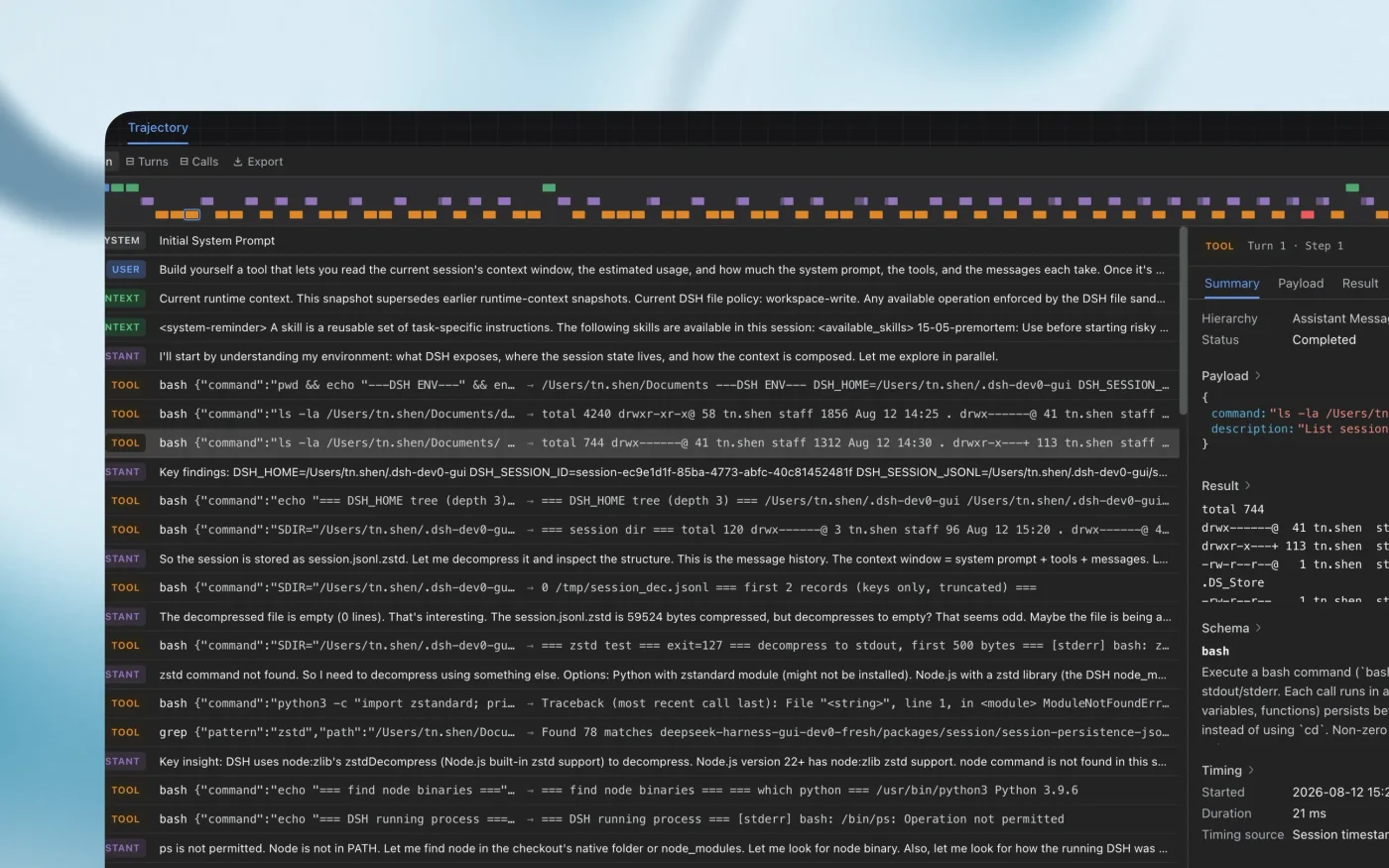
For troubleshooting, a trajectory view shows every turn, tool call, payload and timing.
What is new, and what is not
The project itself is not brand new. The repository was created on August 13, has had frequent release candidates since mid-August, and had about 242,000 stars when we checked on October 1. What the current preview brings is a more finished product around it. The 0.2 release candidates, published on September 28 and 29, among other things:
- bundle the
dshcommand with the macOS and Windows desktop apps, with no separate Node or pnpm install; - move automation tasks into an optional plugin bundle and improve the plugin manager;
- let sessions using DeepSeek account models search the web without an extra API key;
- tell the agent to verify side effects before retrying an operation whose outcome is unknown, and to check resolved paths before deleting or moving files;
- update the third-party model catalog, so other providers’ models can be selected;
- add an experimental asynchronous question mode.
The README is blunt about the state: “developer preview,” with “compatibility-breaking changes” to come.
What the safety notice says
SAFETY.md is unusually direct. It says Harness “has not undergone a security audit and must not be treated as secure or production-ready.” It can execute model-generated code and commands, load third-party plugins, and access the network, processes, credentials and files it is given. Sandboxing, approval prompts and permission controls “do not guarantee isolation or prevent damage.” DeepSeek recommends running it with least privilege, preferably in a disposable VM, container or dedicated environment, keeping backups, not exposing sensitive credentials, and reviewing plugins and commands before running them.
Our take
- The plugin-first design is the real story. Earlier today we covered Claude Code mods, which let plugins hook into an existing tool. Harness starts from the other end: the whole app is assembled from plugins, and Creator mode lets the agent write new ones. That lowers the barrier to customizing an agent, and it also means more code from more authors running inside it.
- Take the safety notice at its word. An agent app that can run code, install plugins and use your credentials is closer to a developer tool than a chat app. For now we would use it in a separate user account, VM or container, not on a machine with production credentials. The sandbox questions we have raised before apply here too.
- Know where your data goes. The default experience uses DeepSeek account models, and the catalog also lists other providers. Before using it with work documents, check which model provider a session uses and that provider’s data terms. We have not reviewed DeepSeek’s privacy policy for this article.
- Popularity is not maturity. A quarter of a million stars shows interest, not stability. With breaking changes promised, it is a good time to experiment and a poor time to build a team workflow on it.
Editorial review: October 1, 2026 (AI). Prepared from the official DeepSeek Harness page, the GitHub README, SAFETY.md and the v0.2.0 release notes, all read on the same day. We did not install or run Harness. Images are DeepSeek’s, reproduced with credit and a link to the source. The opinions in “Our take” are ours.
Sources
- DeepSeek Harness ↗DeepSeek
- deepseek-ai/deepseek-harness (README, SAFETY.md, releases) ↗DeepSeek / GitHub
- dsh-v0.2.0-rc.2 release notes ↗DeepSeek / GitHub
- A Programming Paradigm for Spatiotemporal Composability (Cordis) ↗arXiv
Created with AI assistance.
Suggest a correction
Found an error or a missing source? Send a private suggestion to the editor. It will be reviewed and will not appear as a public comment. No name, email or account is needed.


Send us a message