iPScanner
Discover IPv4 devices, inspect services, and compare network snapshots in a native macOS app with signed in-app updates.

iPScanner brings everyday IPv4 network discovery into a native SwiftUI app. Find responding devices, inspect names and services, label equipment, and save a snapshot to compare with your next scan.
What it does
| Task | Tools available |
|---|---|
| Discover devices | IP addresses, CIDR blocks, ranges, or imported target lists; Quick, Standard, and Deep profiles |
| Understand a result | DNS names, MAC/vendor status, ports, Bonjour services, and device-type evidence |
| Find equipment again | Searchable labels and #tags, table filters, and saved networks |
| Compare and share | Saved snapshots, change comparison, CSV, JSON, IP:Port lists, and text reports |
| Troubleshoot | Live ping, service banners, connection tools, and Wake-on-LAN |
| Automate a scan | A bundled command-line tool using the same discovery engine |
Updated in 1.3.0
The September 26, 2026 release fixes the filename collision that prevented 1.2.0 from opening. It also keeps discovery, port checks, and enrichment within one cancellable scan, so late results cannot overwrite a newer scan or a loaded snapshot.
Compact controls, an optional sidebar, and adaptive device details make the interface easier to use at different window sizes. Vendor status and device-type estimates now include clearer explanations. Native Help and Settings, a refreshed radar icon, and signed update installation complete the update.
Product tour
Watch the 11-second interface tour
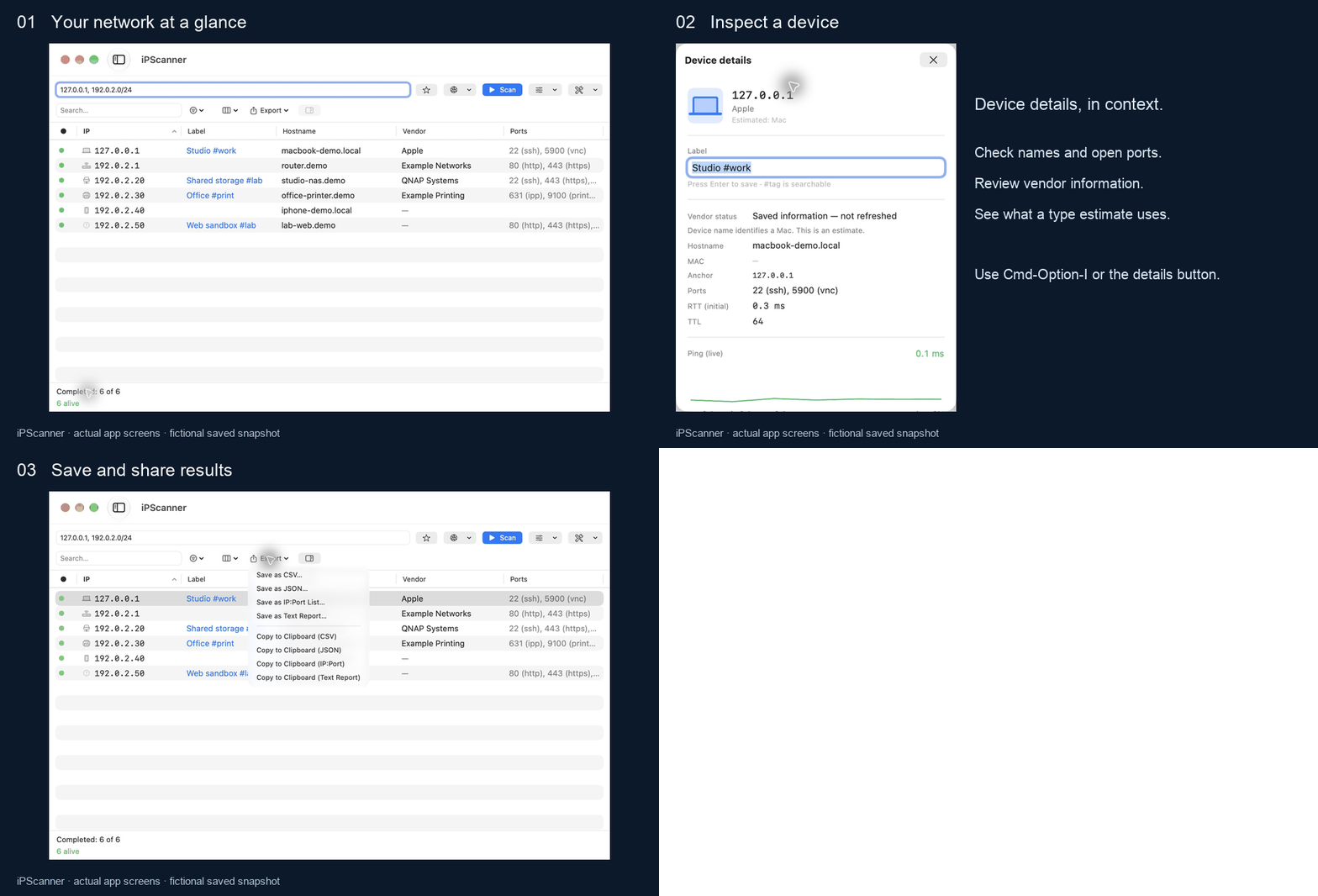
The screenshots below also use sample data. To explore the interface yourself, open the official demo snapshot with File → Open Scan…. Loading it does not start network discovery; the first device’s detail view pings localhost only.
Installation and updates
Download the latest DMG from GitHub Releases, then drag iPScanner to Applications. Version 1.3.0 is Developer ID signed and notarized; the old quarantine-removal instructions no longer apply to this release.
Users of 1.2.0 need to install 1.3.0 manually once. Future signed updates can be installed within the app through Sparkle. Daily checks are optional, and manual checks are available in Help and Settings.
Select a network you administer, leave the profile on Standard, and choose Scan. Select a result and open Device Details with ⌘⌥I; use Export to save the results.
The bundled CLI has moved to iPScanner.app/Contents/Helpers/ipscanner. Update scripts that still use the old Contents/MacOS/ipscanner path. See the CLI reference for examples.
Privacy and practical limits
Discovery runs against the targets you select, and vendor lookup uses an offline IEEE index. The project reports no telemetry. Update checks contact GitHub; feedback is sent only after you review and submit it, through Cloudflare to a public GitHub issue. Scan results, IPs, and MAC addresses are not attached automatically.
A timeout does not prove that a device is offline. MAC addresses can be unavailable across routers or under macOS privacy restrictions; randomized addresses do not identify a manufacturer. Device types remain estimates, and sending a Wake-on-LAN packet does not confirm that a device woke up.
The acceptance notes track pending checks, including Intel hardware and some supported macOS versions. On macOS 27, MAC access may require additional capabilities and provisioning; verification remains open. IPv6 and menu-bar mode are outside this release.
Screenshots


