Microsoft Execution Containers is generally available: what Windows now offers for sandboxing AI agents
Microsoft made MXC generally available on Windows 11: four containment backends, three policy modes, an MIT-licensed SDK and a list of supporting agents.
In this article
Microsoft has made a sandbox for AI agents a built-in part of Windows. On October 7 it announced that Microsoft Execution Containers (MXC) is generally available on Windows 11, with a policy model that lets a developer or an IT team say which files and network destinations an agent can reach and have the operating system enforce it. We read Microsoft’s developer post, its Windows Experience Blog post, the GitHub and Microsoft deep dive on Copilot’s use of it, and the MXC repository. We have not run MXC, so what follows is Microsoft’s description plus the repository’s public state. It answers the same worry as Anthropic’s report on unintended Claude actions: an agent that meets a system it was never meant to touch.
What did Microsoft announce?
MXC is generally available, and Windows 365 support for it is too, so agents can run next to existing work on Cloud PCs. Microsoft frames it as the “containment” layer of three platform capabilities it is building for agents: containment (what an agent may access and do), identity (telling an agent’s activity apart from a person’s) and manageability (tools to govern and monitor). Identity and manageability are not finished: Microsoft says Windows will soon let Microsoft Entra distinguish agent activity from user activity, and will extend Microsoft Agent 365 controls to local agents on a device so IT can manage MXC containers, apply policies and monitor activity. Microsoft’s own footnote says governance at scale may require additional services, and another that features roll out over time through Windows Update.
What is MXC, and what does it contain?
It is a policy-driven execution layer for untrusted code or dynamically generated workloads. In an agent setup, developers can contain model-generated output, plugins, tools, the agent harness or the whole agent. They declare the resources a workload needs, such as files and network destinations, and MXC enforces the boundary with the appropriate container. The policy stays outside the workload’s control, so the agent or generated code cannot grant itself more access. Microsoft puts it plainly: “An agent cannot be its own security authority.” Developers use one JSON configuration schema and a multi-language SDK, and MXC maps the requested controls to the chosen backend on Windows, macOS or Linux.
Microsoft’s example is a coding agent asked to update a website: it can read and write the repository and use the build tools, may read production server configuration, and is not authorized to change it. If the agent tries, containment is designed to block the operation whatever the model, generated code, plugin or tool decides.
Which containment backends are there?
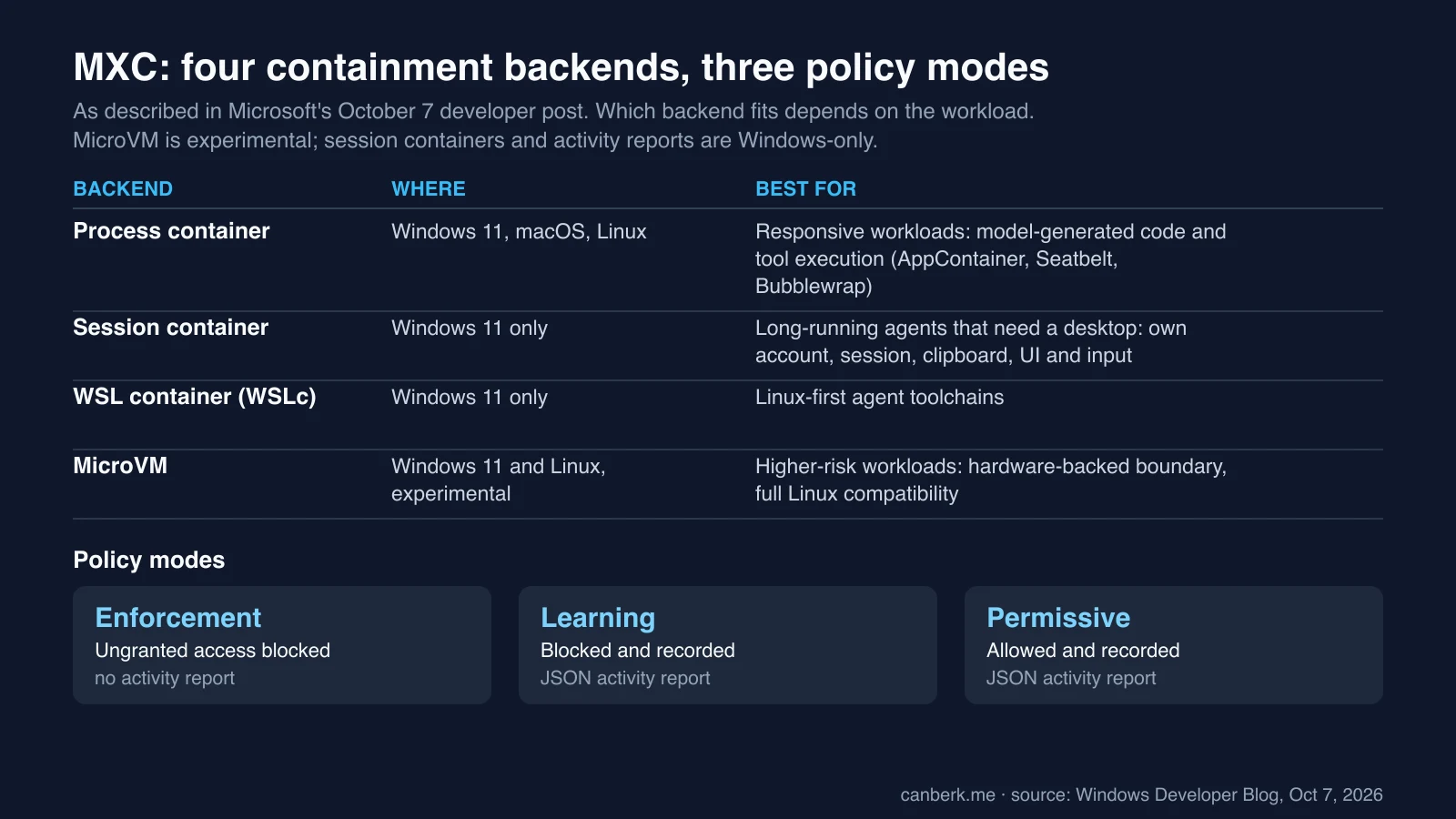
Four, with different isolation strength and platform reach:
- Process container. Windows 11, macOS and Linux. Lightweight, for responsive work such as model-generated code and tool execution; it uses AppContainer on Windows, Seatbelt on macOS and Bubblewrap on Linux.
- Session container. Windows 11 only. Runs an agent in a separate, OS-isolated session under its own account, with its own desktop, clipboard, UI and input boundaries; it is meant for long-running agents and automation.
- WSL container (WSLc). Windows 11 only. A Linux execution environment through WSL for Linux-first agent toolchains.
- MicroVM. Windows 11 and Linux, experimental. A hardware-backed virtualized boundary with full Linux workload compatibility, for higher-risk workloads.
Microsoft adds that each backend has distinct security properties and workloads should be evaluated for fit.
How does a policy work, and what are the three modes?
A policy has five areas: containment (the isolation environment), process (the command, arguments, working directory and environment), file system (what can be modified, read or is off limits), network (inbound and outbound connectivity, including host loopback) and user interface (access to the desktop and related resources). Organizations can add constraints through management policy such as Intune, so the same agent can run within different enterprise boundaries without the developer encoding them. Microsoft says Intune policy will soon manage MXC process containers on Windows 11.
Writing a least-privilege policy is hard when you do not know what an agent needs, so MXC has three modes:
- Enforcement. Ungranted access is blocked, with no activity report. This is production.
- Learning. Ungranted access is blocked and recorded in a JSON activity report, to diagnose failures and check that a policy grants only what is required.
- Permissive. Ungranted access is allowed and recorded, to observe an agent without enforcing the policy. It does not bypass other operating-system or organizational restrictions.
Activity reports are produced only on Windows, from process containers. If a policy blocks something, Microsoft says an agent should explain that it cannot complete the task within the permissions and request an action where supported, not fail silently.
Which agents support it?
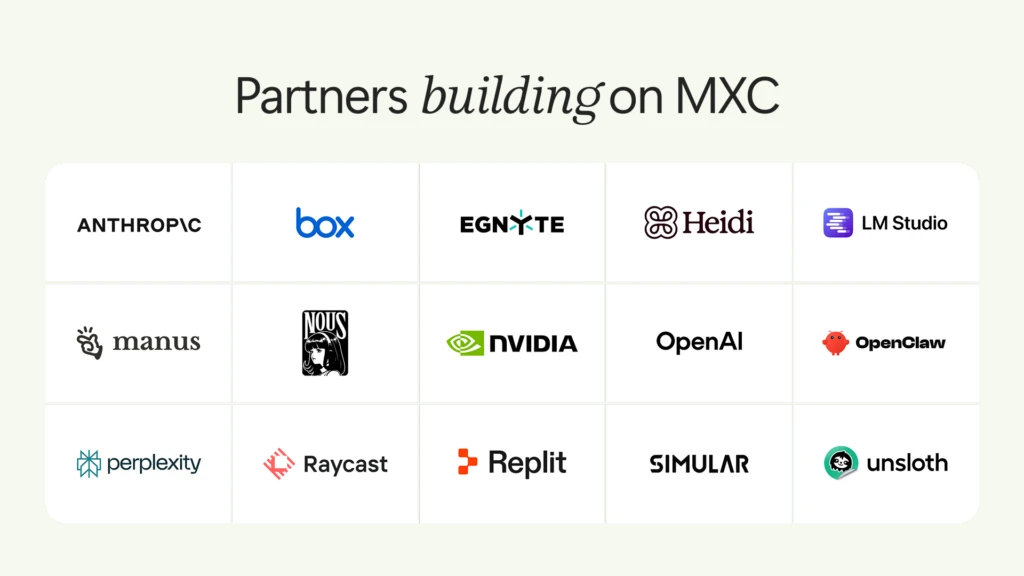
Microsoft names OpenAI Codex, GitHub Copilot, OpenClaw, Replit, LM Studio and Unsloth as supporting MXC already, and NVIDIA has integrated OpenShell into it, adding policy controls for access to files and inference services, advanced network controls, credential management and, for enterprises, OCSF auditing. Anthropic’s Claude Code is listed among agents that will release support, with Box, Egnyte, Heidi Health, Hermes Agent by Nous Research, Manus, Perplexity, Raycast and Simular. Meta’s Muse for Windows, a personal agent, is coming soon as a native Windows app with MXC integration. Microsoft’s partner graphic does not say which partners ship support today, so we rely on the written lists.
How does GitHub Copilot use it?
Per the GitHub and Microsoft post, Copilot uses MXC as an open-source library that turns policy into native operating-system controls. On Windows it uses the BaseContainer tier of the process-container backend, on macOS Seatbelt and on Linux bubblewrap, and these local backends need no separate virtual machine or container image. When sandboxing is on, shell commands and, by default, local Model Context Protocol servers and language servers run inside the process boundary. The authors flag limits: Copilot’s built-in file tools run inside Copilot itself, so the agent harness checks their requests against the policy, but that is not OS-enforced child-process isolation; remote MCP servers sit outside the local sandbox, where Copilot checks their connection policy in process. The /sandbox command in Copilot CLI sets it up.
How mature is it, and is it open source?
It is an MIT-licensed project written mostly in Rust. The GitHub repository was created on February 6, 2026, and its releases ran v0.8.0 (August 22), v0.9.0 (September 29) and v1.0.0 (October 7). When we checked through GitHub’s API on October 11 it had 2,622 stars, 135 forks and 59 open issues, and its last push was on October 10. Microsoft says it will keep expanding backends, policy authoring, manageability and observability, and invites feedback through GitHub issues.
What does Microsoft not say?
- Independent testing. Nothing here is third-party verification; every strength statement is Microsoft’s.
- Strength of each backend. Microsoft says only that backends differ and should be evaluated for fit, and MicroVM is experimental.
- Admin pieces. Entra agent identity and Intune policy for MXC are “soon”, and Agent 365 extension to local agents is also upcoming.
- Claude Code. Anthropic’s agent appears on the “will release support” list, with no date; we did not look for an Anthropic statement on timing.
- Scope. Footnotes say availability and timing may vary by device, market and silicon platform.
What to keep in mind
These are our observations:
- The boundary sits outside the agent, which is the point. Microsoft’s statement that an agent cannot be its own security authority echoes the lesson of Anthropic’s report, where a length limit on one tool was bypassed by a different route. A containment layer limits the action itself.
- Learning mode is the practical step. Running a new agent in Learning mode produces a record of what it tried to touch, which is a better starting point for a least-privilege policy than guessing.
- Read the sandbox’s edges. In Copilot’s case, shell commands are sandboxed but built-in file tools and remote MCP servers are checked differently. Know which of your agent’s actions fall inside the boundary.
- Virtualization admins have a reference here. MicroVM and WSLc are Microsoft’s answers to hardware-backed isolation, and one of them is explicitly experimental.
- Check support before relying on it. Whether your agent integrates MXC today is a per-agent question, and some on Microsoft’s list are future.
Editorial review: October 11, 2026 (AI). Prepared from Microsoft’s Windows Developer Blog and Windows Experience Blog posts and the Microsoft Command Line post (read in full on October 11 through our browser), and from the MXC repository’s public GitHub data. We did not run MXC, did not read the repository’s documentation or code, and did not read Microsoft’s linked documentation. The cover and partner graphic are Microsoft’s; the backends table is ours. “What to keep in mind” is ours.
Sources
- Microsoft Execution Containers: Policy-driven containment for AI agents (Windows Developer Blog, October 7, 2026) ↗Microsoft (Windows Developer Blog)
- Building Windows for hybrid intelligence (Windows Experience Blog, October 7, 2026) ↗Microsoft (Windows Experience Blog)
- Bringing local models and sandboxed tools to Windows and GitHub Copilot (Microsoft Command Line, October 7, 2026) ↗Microsoft and GitHub
- microsoft/mxc (GitHub) ↗Microsoft (GitHub)
Created with AI assistance.
Suggest a correction
Found an error or a missing source? Send a private suggestion to the editor. It will be reviewed and will not appear as a public comment. No name, email or account is needed.


Send us a message