6–7 months with Poke: a personal AI agent in iMessage
My Poke Pro routine in Turkish: AI news, market briefings and Gmail alerts through iMessage, alongside official product details and practical limits.

In this article
At 10:00, I get an update on developments in AI. At 11:00, I receive a briefing on the markets I follow. Important messages arriving in Gmail also reach me as notifications in the same iMessage conversation. These three workflows define Poke’s place in my day.
I have actively used Poke for roughly 6–7 months, on the Pro plan and in Turkish. This article brings my routine together with what the product currently offers. The experience sections describe my personal use; plan, integration and data-handling details come from official sources checked on September 23, 2026.
What kind of personal agent is Poke?
Poke is an AI assistant that works inside messaging apps. Its official guide lists Apple Messages, Telegram, WhatsApp and RCS, with email tasks, calendar management, reminders and web search. My channel is iMessage.
In my case, that interface serves a concrete purpose: news, market tracking and email alerts meet in one conversation. Two routines follow a schedule, while the email notifications relate to incoming messages. It gives me a way to assess the idea of a personal agent through recurring tasks in an ordinary day.
My daily routine: three separate workflows
10:00 — AI news
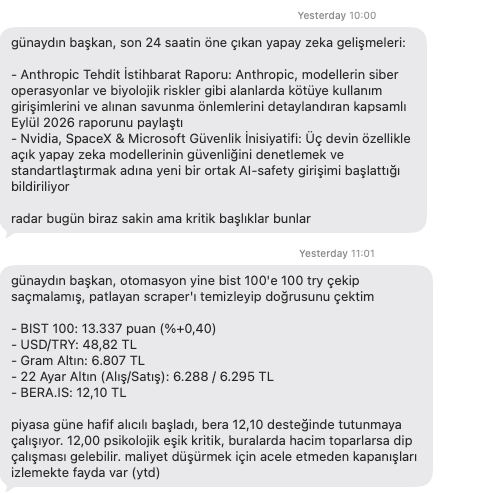
Every day at 10:00, Poke sends information about developments and new releases in AI. This is the regular news-tracking part of my setup. The subject is defined, the delivery is scheduled, and the conversation is in Turkish.
In the example I shared, the news message is marked 10:00 and briefly covers two topics. The visible message contains no source links. That is a concrete limitation to consider: when I want to examine a development more closely, I need a route back to the original announcement. The screenshot below illustrates the format and workflow; this article does not republish its news claims as independently verified reporting.
11:00 — Market briefing
The second routine arrives at 11:00: changes, prices and a short analysis covering the US and Turkish stocks I requested, the US dollar, the euro and gold. The assets I want to follow define this briefing’s scope.
The example market message is marked 11:01. More significantly, Poke opens by saying its automation incorrectly retrieved “100 TRY” for the BIST 100, and that it fixed the data-collection issue and fetched information again. The conversation therefore records a reported data error alongside the resulting briefing.
Saying it fixed the problem does not, by itself, establish that the replacement figures are correct; I did not inspect the automation’s backend logs for this article. My takeaway is that a market briefing needs sources and data timestamps as much as fluent prose. The figures in the screenshot should not be read as current market data or a trading recommendation.
During the day — Important Gmail alerts
My Gmail account is connected to Poke. It notifies me through iMessage about important incoming emails. Unlike the news and market briefings, this workflow draws on my own inbox, making its access permissions part of the experience.
According to the FAQ, Gmail and Outlook are supported; iCloud and Yahoo Mail currently are not. Being able to talk through iMessage does not mean you can connect iCloud Mail. My account here concerns Gmail alerts; I am not reporting personal tests of other email providers.
A US$0.01 monthly Pro offer: my negotiation experience
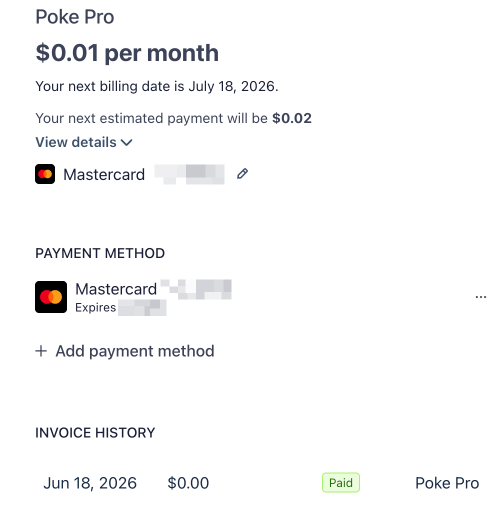
One memorable part of subscribing was that I discussed and negotiated the Pro plan with Poke, and my subscription screen ended up showing US$0.01 per month. The link provided in the conversation let me access the plan details. The screenshot I shared records the outcome of that personal offer.
The distinction matters: US$0.01 is the listed monthly plan price. The same image shows an estimated next payment of US$0.02 and a US$0.00 invoice dated June 18, 2026. I am therefore not presenting it as a bank receipt proving a US$0.01 charge. Nor does it establish that every user will receive the same offer or that the same negotiation process remains available today.
The current monthly plan listing is:
| Plan | Listed monthly price | Official focus |
|---|---|---|
| Free | US$0 | Trying the product and basic use |
| Pro | US$19 | A larger usage allowance and background automations |
| Ultra | US$199 | Frontier models for every action and credits with additional usage available |
These are the list prices on the date checked, not the outcome of my own subscription negotiation.
The usage documentation says Pro’s allowance refills on a rolling basis. Exhausting it triggers a more limited mode; demanding work may wait for a refill. Frequently running automations can increase consumption. Ultra uses monthly credits, and unused included credits do not roll over. Automation frequency therefore matters when considering a plan.
What are Automations, Integrations and Recipes for?
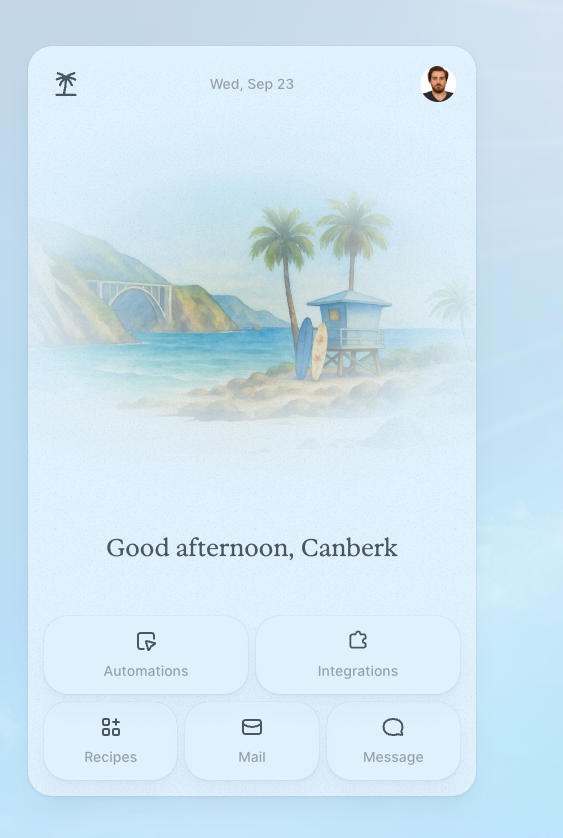
The home screen in my Poke account presents five shortcuts: Automations, Integrations, Recipes, Mail and Message. While the conversation continues in iMessage, this screen brings together entry points to the other parts of the product.
| Area | Practical role |
|---|---|
| Automations | Recurring or scheduled work; my 10:00 and 11:00 routines are examples of this use |
| Integrations | Access to a connected service; Gmail in my setup |
| Recipes | Prepared setups combining connections with starting instructions |
This distinction draws on the product’s description of scheduling and the Recipe documentation. It does not mean I have tried every prepared setup in my account.
Poke’s integration guide lists services including GitHub, Notion and Linear. The Recipes directory provides automation and integration filters, plus topics such as email, developer tools and scheduling. That makes it possible to explore a task by need as well as by service name.
My assessment is that Recipes’ value lies in making the starting point for setup concrete. A prepared workflow can be easier to understand than connecting an account and then deciding what to ask for. However, even a simple-looking Recipe warrants a look at what it can read and what actions it can take. Summarizing an email and acting through that account involve different permission needs.
Kitchen provides a place to build a Recipe, specify its integrations and share an installation link. MCP support allows custom tools and data sources to be connected. An infrastructure team could, for example, investigate exposing a narrowly scoped information tool through this messaging interface. That is a possible application inferred from the documentation, not an SRE integration I have built and tested.
The current FAQ also describes Poke Human, a separate service within Ultra that delegates some real-world tasks to human operators. My experience here covers Pro, iMessage and Gmail; it does not evaluate the human-operator service. Source: Poke FAQ.
Data and permissions when connecting Gmail
The September 11 privacy policy says Google data is accessed with authorization and is neither sold nor used for advertising. It describes exceptions allowing human access, including user permission, security and legal requirements. These are the company’s policy statements; this article is not an independent security audit.
Access can be revoked within Poke or through Google account permissions. The integration management guide also provides a disconnect option for other services. A familiar messaging interface does not make inbox permissions unimportant. Connecting a work account should be considered against the organization’s data-sharing rules, separately from this personal-use example.
What does this experience show?
The most concrete result of my six to seven months of use is that three tasks have become an ongoing routine: AI news in Turkish, selected market information and important email alerts. The example shows why evaluating a personal agent involves considering habits, data sources and the notification channel together.
The daily conversation example also provides two points to assess: the lack of source links in the visible news summary and Poke’s report of a data error in the market workflow. Both belong alongside the account of continued use. I am not presenting measured time savings or an error rate; continued use does not prove that every piece of information is correct.
There is also a dated development concerning the team behind the product: Cognition announced on July 23, 2026 that Interaction was joining it. The announcement said Poke users could continue using the product. This article focuses on the tasks a messaging-based agent handles in everyday use, beyond that company news.
Sources
- Poke — product and monthly plans ↗Poke
- Welcome to Poke ↗Poke
- Email support, account management and Poke Human ↗Poke
- Managing integrations ↗Poke
- Usage and resets ↗Poke
- Creating recipes in Kitchen ↗Poke
- Recipes directory ↗Poke
- Custom MCP servers ↗Poke
- Privacy policy — September 11, 2026 ↗The Interaction Company of California
- Welcoming The Interaction Company — July 23, 2026 ↗Cognition
Created with AI assistance.
Suggest a correction
Found an error or a missing source? Send a private suggestion to the editor. It will be reviewed and will not appear as a public comment. No name, email or account is needed.


Send us a message