Claude in Google Docs, Sheets and Slides: install paths, admin controls and the limits of the beta
What Claude's Help Center says about the Google add-on: install and admin paths, two permissions, 30-day retention, unsupported setups and known limits.
In this article
- How do you install it for yourself or for your organization?
- What is the difference between the add-on and the connectors?
- What permissions does the add-on ask Google for?
- What can Claude do in your file, and when does it stop to ask?
- What can’t it do yet?
- How is your data handled?
- Which enterprise controls apply?
- Does it guard against prompt injection?
- What to keep in mind
Claude’s Help Center now documents how the Google Workspace add-on is installed, what it asks Google for and where it stops, and it fills several gaps we noted in our earlier article on the announcement. The short version for admins: the install route depends on your Google Workspace Marketplace settings, not on your Claude plan; the add-on is limited to the single file it is opened in; and several enterprise options, including Zero Data Retention and third-party inference, are not available in the beta. We read the Help Center article for the add-on, its article on the Google connectors and Anthropic’s announcement. We have not tested the add-on, so everything below is Anthropic’s description.
How do you install it for yourself or for your organization?
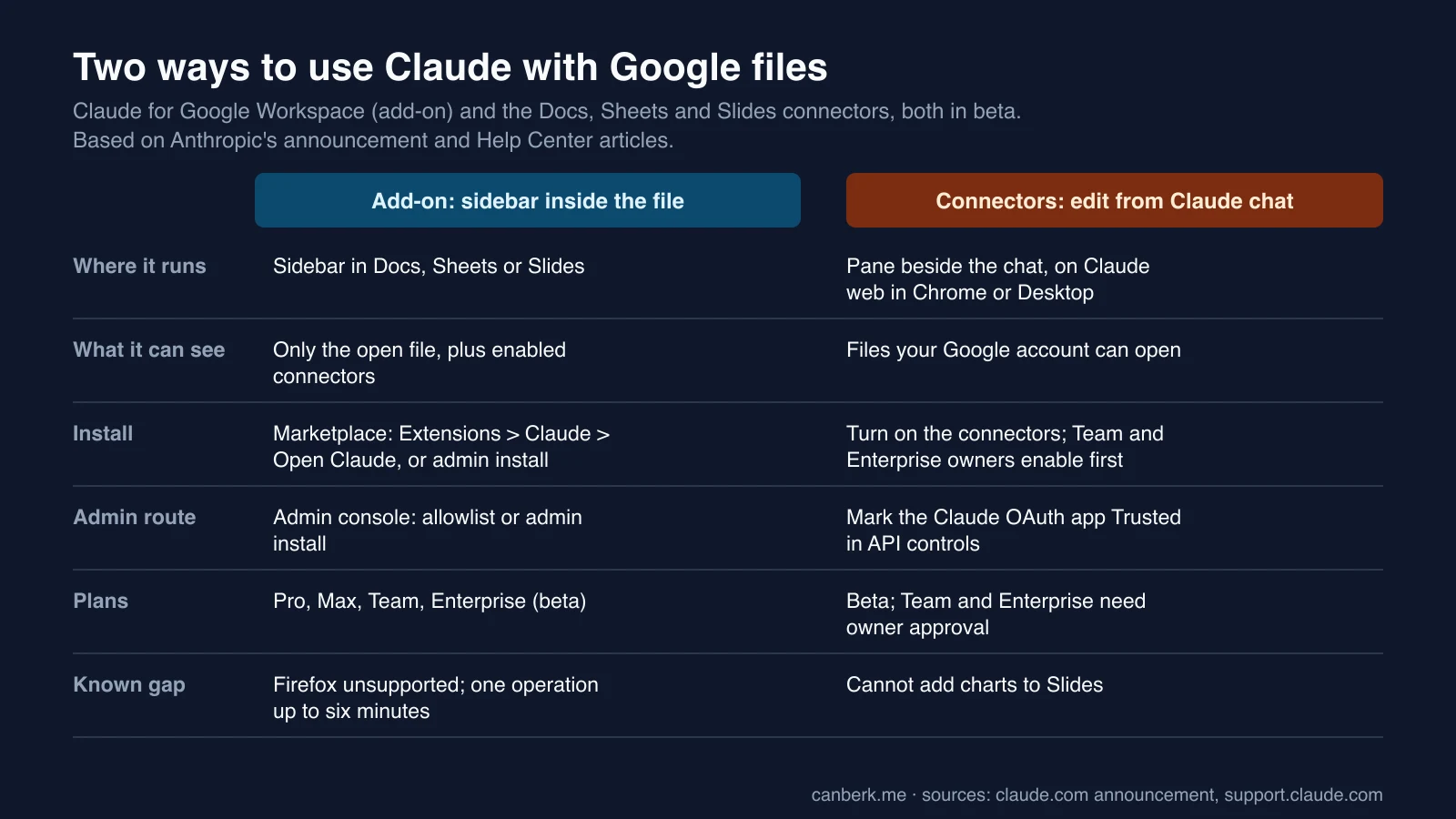
You need a Pro, Max, Team or Enterprise plan and a Google account that is allowed to install Marketplace apps. Which install route you can use depends on your Google Workspace admin’s Marketplace settings, not on your Claude plan.
- For yourself. Open the Claude listing in the Google Workspace Marketplace, click Install, choose your Google account, review the permissions and click Allow, then reload any open files. One install covers Docs, Sheets and Slides. Open it from Extensions, Claude, Open Claude; Alt+/ (Option+/ on Mac) and typing “Claude” also finds it.
- For the organization. A Workspace super admin opens the listing, clicks Admin install, picks everyone or specific groups or organizational units, accepts the data access and terms and clicks Finish. Users reload their files and Claude appears under Extensions. Removal is in the Admin console under Apps, Google Workspace Marketplace apps: select Claude and Uninstall app; it takes effect for all users on their next reload.
- If your organization blocks Marketplace apps. Either allowlist Claude, which needs Marketplace access set to allow only allowlisted apps, or use Admin install, which works even while user installs are blocked. The message “This application is not allowed by your administrator” comes from Google, and only a Workspace admin can clear it.
What is the difference between the add-on and the connectors?
The add-on brings Claude into a file; the connectors let Claude open and edit files from a chat. The add-on is a sidebar in Docs, Sheets and Slides that sees only the open file. The connectors are separate: you turn them on in Claude, paste a Google link or ask for a new Google file, and the file opens in a pane beside the chat, on Claude on the web in Chrome or on Claude Desktop with the built-in browser turned on (it is off by default on Enterprise; “Open in Google” is the fallback). Per the connector article, they can also read and work with comments and suggestions in Docs, which the add-on cannot, and they cannot add charts to Slides.
On Team and Enterprise, an owner or primary owner has to enable the connectors first. If your Google organization blocks the connector, the admin route is different: in the Google Admin console, under Security, Access and data control, API controls and Manage third-party app access, add Claude’s OAuth app and set it to Trusted. Propagation takes about 15 minutes, and the same app covers Docs, Sheets and Slides, so no separate approval is needed for each file type.
What permissions does the add-on ask Google for?
Two. The first lets it show and run third-party web content in sidebars inside Google applications, which is how the sidebar appears. The second lets it view and manage the documents, spreadsheets or presentations the app is installed in, so it can read and edit the one file you opened it in. The Help Center says Google enforces that limit, and that the add-on does not request access to Drive, Gmail, Calendar, contacts or the ability to make network requests from your file. It adds one exception: if you have the Google Drive connector in Claude connected, Claude can use it to see other files, and that is off by default.
What can Claude do in your file, and when does it stop to ask?
It reads the relevant parts of the open file plus your selection, edits in place, and Google records the changes under your name in version history, so Undo and earlier versions work. The mode selector at the bottom of the sidebar has two settings:
- Ask before edits (default). Claude describes what it is about to do in plain language and waits for you to click Allow.
- Accept all edits. Claude makes ordinary content edits without stopping, but still pauses on anything that touches links, external images, web addresses or someone’s access to the file.
Regardless of mode, Claude stops and asks before inserting an image from a web address, adding a link or removing anyone’s access. These carry a “Security review” label with no “always allow”. Claude cannot share the file, give anyone access or change ownership, cannot create menus or scheduled automations, and cannot load arbitrary web pages into your file. Anthropic’s announcement describes Accept all edits as applying changes without stopping; the Help Center page adds these exceptions. In Docs, the sidebar’s suggestion cards are not the same as Google’s own suggestions: Claude’s edits land as direct edits, and it cannot accept or reject existing suggestions.
What can’t it do yet?
The Help Center lists limits for the whole add-on and for each app:
- All three apps. It works only on the file it is opened in, and cannot open, create or copy other Drive files or export a PDF. Keep the sidebar open or the task stops. Chrome, Edge and Safari are supported; Firefox is not, and the sidebar loads but actions do not complete. There is no voice dictation. One long operation can run up to six minutes before Google stops it, so stage big jobs.
- Docs. It cannot read, reply to or resolve comments, accept or reject existing suggestions, or create, rename or reorder tabs, though it can read and edit the content of every tab.
- Sheets. It cannot read Connected Sheets tabs backed by BigQuery (extract the rows into a regular tab first), and cannot create triggers, custom menus or scheduled refreshes.
- Slides. Charts it creates are inserted as images, not linked Sheets charts, so they do not update when numbers change, and it cannot refresh an existing linked chart.
- Not available. “Work across apps”, the Microsoft 365 feature that hands a task between Excel, Word and PowerPoint.
How is your data handled?
Content from the open file, your messages and attached files are sent to Claude to generate a response. For Team and Enterprise this falls under the organization’s Commercial Terms and Data Processing Addendum, and for Pro and Max under the Consumer Terms and Privacy Policy. Per the Help Center, Anthropic does not use this content to train its models, use of Workspace API data follows Google’s API Services User Data Policy including its Limited Use requirements, and inputs and outputs are deleted from Anthropic’s systems within 30 days except as described in its data-retention article. The extension does not inherit custom retention settings an organization has set. Chat history is stored in your browser, per file, is not synced and does not follow a copy of the file; collaborators see Claude’s edits in the file and in version history, attributed to you, but not your chat.
Which enterprise controls apply?
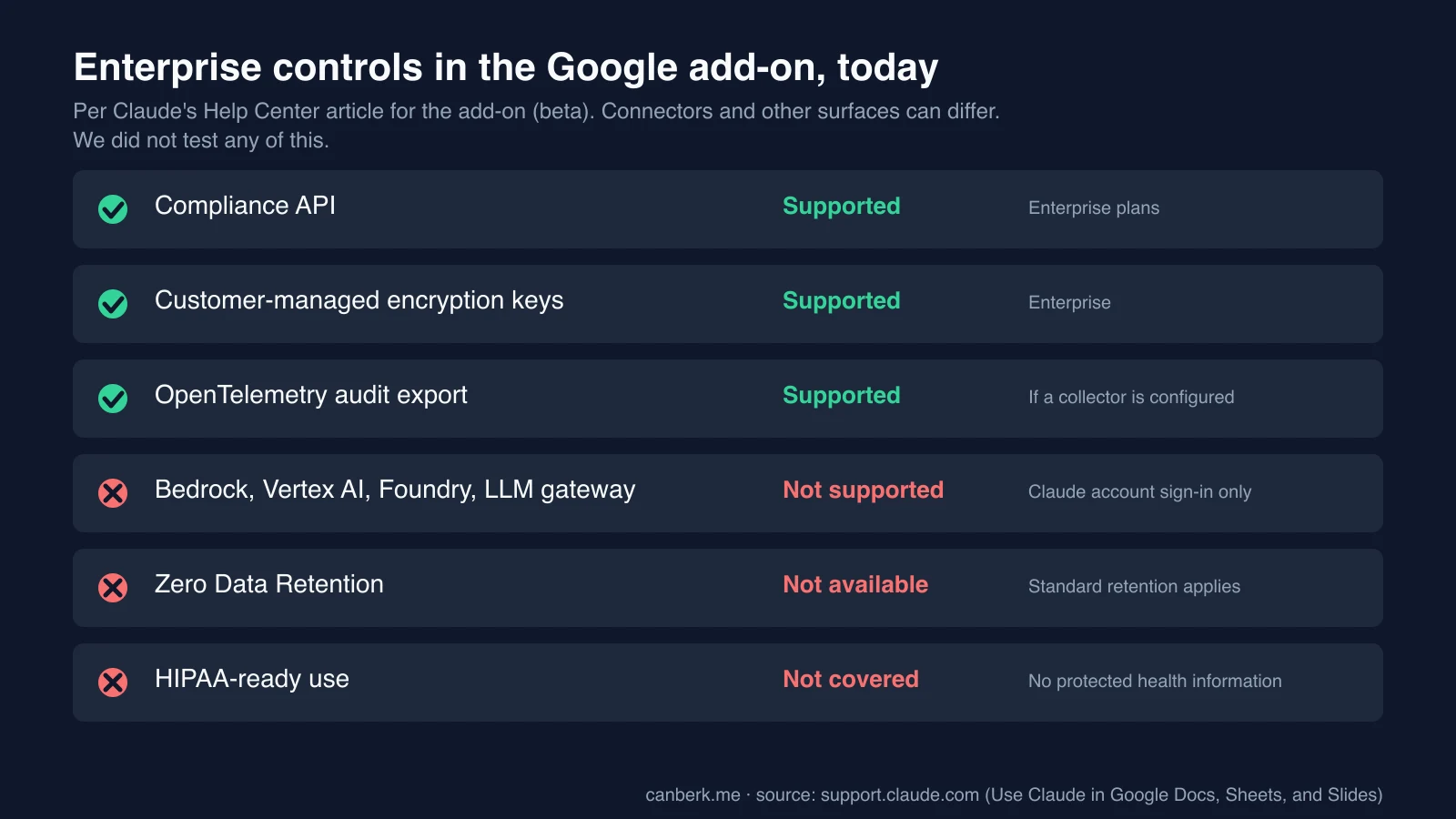
On Enterprise, the Compliance API captures sessions, including prompts, responses, tool calls and edits, through the same endpoints and access keys as Claude for Microsoft 365. Customer-managed encryption keys apply to the conversation data Anthropic stores. OpenTelemetry audit export works if a custom collector for Office agents is configured in Claude’s organization settings. Not supported in the beta: third-party inference through Amazon Bedrock, Google Cloud Vertex AI, Azure AI Foundry or an LLM gateway, because users sign in with a Claude account (SSO included) and API keys or cloud sign-in are not accepted; Zero Data Retention; and HIPAA-ready organizations, with the Help Center saying not to use the extension with protected health information. Claude admins control which connectors, skills and models the sidebar offers, inheriting those from the Claude organization.
Does it guard against prompt injection?
The Help Center says Claude treats a document’s content as data rather than commands, labels hidden text it finds (white text or tiny fonts, for example), and is designed not to follow a document’s instruction to share the file, fetch a link or contact anyone. It also tells users to review proposed actions before approving them, especially in files from outside the organization. That is a design statement we could not test.
What to keep in mind
These are our observations:
- The decision is a Marketplace policy, not a plan. If installs are blocked, an allowlist or admin install is what unlocks it, and an admin install can be scoped to groups, which suits a pilot.
- Regulated teams are outside the beta today. With no Zero Data Retention, no Bedrock or Vertex route and no HIPAA coverage, those teams should treat this as unavailable for sensitive files.
- Plan around the six-minute cap and the single-file scope. For large sheets or decks, ask Claude to work in stages, and paste in what lives in other files.
- Audit through the Compliance API, not the sidebar. Chat history is local to the browser and per file, while the Compliance API is the record on Enterprise.
- Some gaps from the announcement remain. The Help Center pages we read say nothing on how the add-on counts against plan usage limits, or on regions and Google Workspace editions. This is also separate from Claude’s own Docs and Slides, covered in our Dashboards and Motion article.
Editorial review: October 11, 2026 (AI). Prepared from the Claude Help Center articles for the Google add-on and the Google Workspace connectors, and Anthropic’s October 6 announcement, all read in full on October 11. We did not test the add-on or the connectors, did not read the Marketplace listing or Google’s documentation, and the Help Center can change while the product is in beta. The charts are ours. “What to keep in mind” is ours.
Sources
- Use Claude in Google Docs, Sheets, and Slides (Claude Help Center) ↗Anthropic (Claude Help Center)
- Use Google Workspace connectors (Claude Help Center) ↗Anthropic (Claude Help Center)
- Claude now works with Google Docs, Sheets, and Slides (Anthropic, October 6, 2026) ↗Anthropic (claude.com)
Created with AI assistance.
Suggest a correction
Found an error or a missing source? Send a private suggestion to the editor. It will be reviewed and will not appear as a public comment. No name, email or account is needed.


Send us a message