RTX Spark laptops reviewed: what first tests show for local AI
First RTX Spark laptop reviews: a 35B model at 89 tokens/s, a strong GPU, older CPU cores and a power cut under FP64 load on two units.
In this article
- What launched on October 16?
- How fast is local AI on RTX Spark?
- Can it run 120B models, as Microsoft’s page suggests?
- How does it compare with a dedicated RTX 5090 laptop and with Macs?
- What do the reviews say about CPU and GPU?
- What is the power-cut problem?
- What about battery life and Windows on Arm?
- Who should buy an RTX Spark laptop?
- What is still unknown about RTX Spark laptops?
- What to keep in mind
The first independent tests of NVIDIA’s RTX Spark laptops are out, and they back up the local-AI pitch with one serious catch. The laptops went on sale on October 16, and reviews followed that morning. We read two full reviews, StorageReview’s and Computerworld’s, and a Tech Times roundup of others. This article sets out what they measured, how it compares with Microsoft’s pre-launch claims we covered on October 11 and what is still unknown.
What launched on October 16?
Windows laptops built on NVIDIA’s RTX Spark N1X, a chip with up to 20 Arm CPU cores, a Blackwell GPU with up to 6,144 CUDA cores and up to 128 GB of unified memory. Per our October 11 report, the Surface Laptop Ultra and RTX Spark laptops from ASUS, Dell, HP, Lenovo and MSI were due that day. StorageReview lists the Surface Laptop Ultra from $2,599.99 for an 18-core, 24 GB, 512 GB configuration to $5,899.99 for the 20-core, 128 GB, 1 TB unit it tested. Tech Times says review embargoes lifted the morning of October 16, and the roundup puts ASUS ProArt P16 pricing in Europe at €4,299 for a 64 GB model.
How fast is local AI on RTX Spark?
Fast enough to run 20B to 35B models comfortably, per the two full reviews:
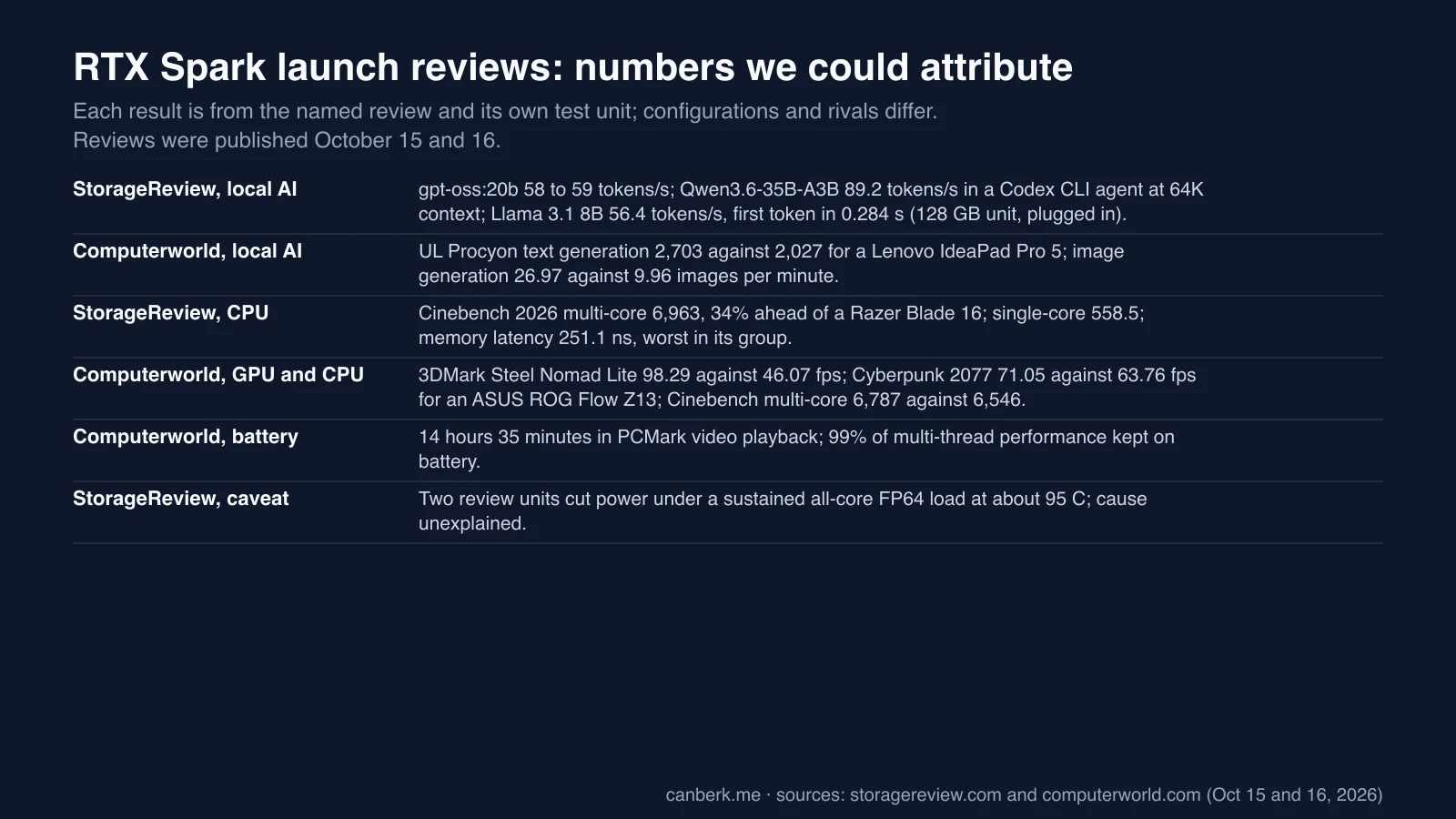
- StorageReview. On a 128 GB unit plugged in on Best performance, gpt-oss:20b reached 58.0 tokens per second at 64K context and 59.2 at 128K in a Codex CLI coding agent, and Qwen3.6-35B-A3B reached 89.2 at 64K. In MLPerf’s Llama 3.1 8B test it generated 56.4 tokens per second with 0.284 seconds to first token, and Phi-4-mini hit 97.5 with 0.127 seconds. Loading gpt-oss:20b to first token took 6.57 seconds from cold. The review does not state the quantization used.
- Computerworld. UL Procyon’s text-generation test scored 2,703 against 2,027 for a Lenovo IdeaPad Pro 5 with an Intel Core Ultra X9 388H, about 33% higher. MLPerf’s Flux 2 Klein 4B image generation produced 26.97 images per minute against 9.96 on the same Lenovo, roughly 2.7 times. The reviewer also ran the Hermes agent framework with Qwen3.8-27B locally, which extracted charts from an Excel file and built a formatted Word report in about five minutes, and says human review remains essential.
Can it run 120B models, as Microsoft’s page suggests?
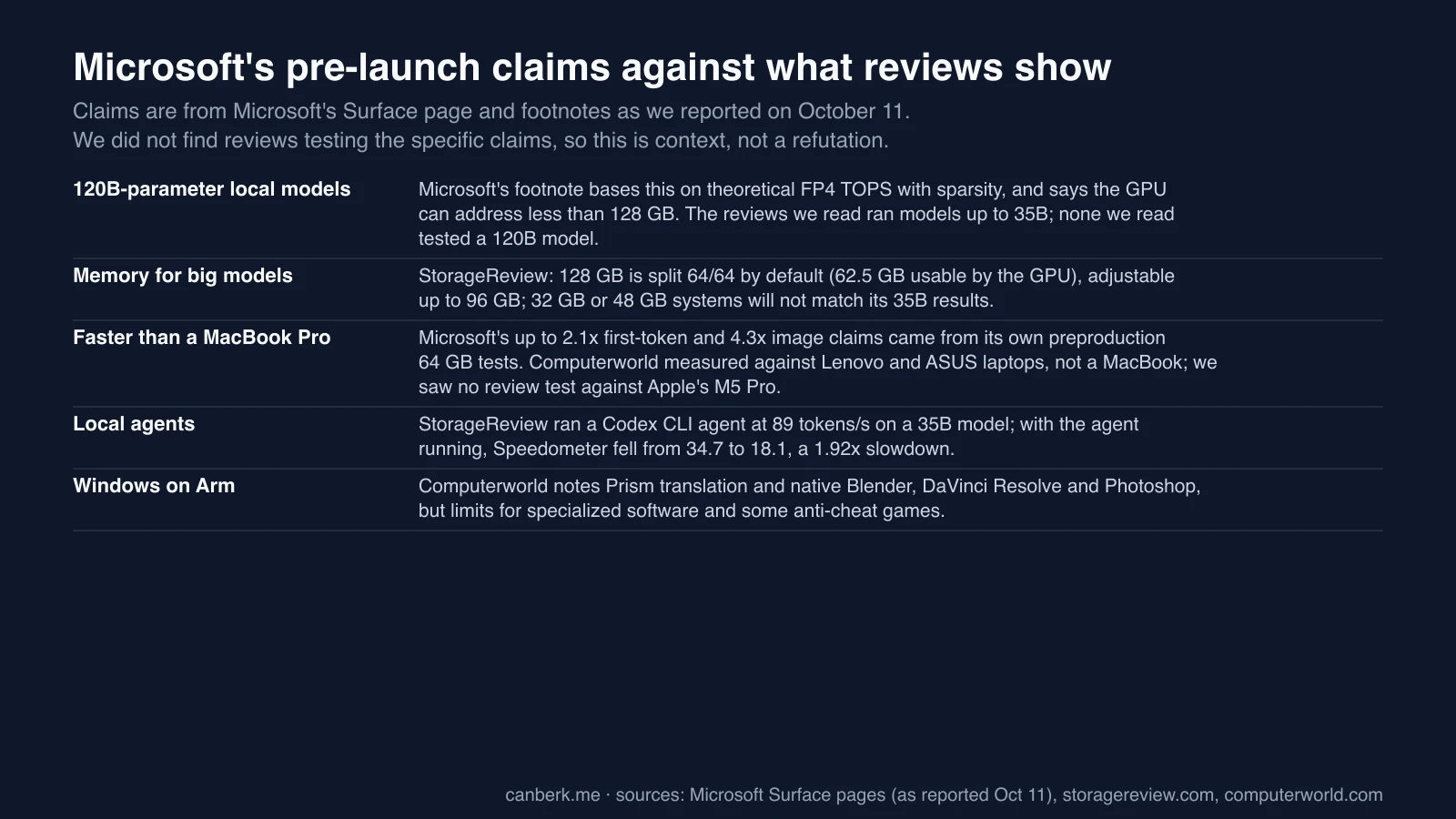
Not in anything we read. Microsoft’s page, as we reported, says the Laptop Ultra can run local agent workflows with models up to 120B parameters, with a footnote basing that on theoretical FP4 TOPS with sparsity and noting the GPU can address less than 128 GB. The reviews we read ran models up to 35B, and neither tested a 120B model. StorageReview adds that the 128 GB is split 64/64 by default, with 62.5 GB usable by the GPU, and that the user can raise the GPU share up to 96 GB; it says 32 GB or 48 GB systems will not produce the same 35B results. Those details matter more than the headline memory figure.
How does it compare with a dedicated RTX 5090 laptop and with Macs?
It runs bigger models, but a discrete RTX 5090 is faster on models that fit. StorageReview says the Razer Blade 16’s RTX 5090 (24 GB) generated about 2.3 times faster on models that fit in 24 GB, but could not run the 35B-class models the Surface handled. With the coding agent running, the Surface’s Speedometer score fell from 34.7 to 18.1, a 1.92 times slowdown, while the Blade’s fell only 6%. Tech Times’ own analysis, not from a review, adds that Apple’s M4 Max has about 540 GB/s of memory bandwidth against about 300 GB/s for the N1X, so Apple would generate tokens faster for models that fit both. Microsoft’s pre-launch MacBook Pro 16-inch with M5 Pro claims came from its own preproduction 64 GB tests, and the reviews we read compared with Lenovo, ASUS and Razer laptops instead.
What do the reviews say about CPU and GPU?
The GPU is the strength and the CPU cores are dated. Computerworld measured 3DMark Steel Nomad Lite at 98.29 fps against 46.07 for the Lenovo IdeaPad Pro 5, 3DMark Speed Way at 30.31 against 19.72 for an ASUS ROG Flow Z13, and Cyberpunk 2077 at 71.05 fps against 63.76 for the Flow Z13, although the AMD machine edged ahead in The Talos Principle 2. On the CPU, Computerworld measured Cinebench 2026 multi-core at 6,787 against 6,546 for the Flow Z13, and StorageReview at 6,963, 34% ahead of the Razer Blade 16, with the group’s highest single-core score (558.5). StorageReview also found weak single-thread, browser and Python results, memory latency of 251.1 ns that was the worst in its group, and a much slower native Arm build of SVT-AV1. Per Tech Times’ roundup, ComputerBase called the Cortex-X925 and A725 cores ARM’s 2024-generation designs, and HotHardware called the GPU “class-leading.”
What is the power-cut problem?
The one caveat in StorageReview’s headline. It reports that the CPU hit 97 to 98 C in every heavy all-core test and held 98 C for 31 minutes in a sustained loop without a fault. But an OpenBLAS all-core double-precision (FP64) solve cut power three times on October 14 at about 95 C. Windows logged a hard power cut (Kernel-Power 41), not a thermal shutdown, and StorageReview concludes the evidence points to “power delivery or firmware protection, not heat.” A first review unit failed the same way and was replaced, and the review says two units have now failed identically, so it marks those results as not finished. It says Microsoft and NVIDIA have yet to explain it. We saw this problem only in StorageReview’s review, so we do not know how common it is.
What about battery life and Windows on Arm?
Good video-playback battery, with caveats. Computerworld measured 14 hours 35 minutes in PCMark video playback, and says the Surface kept 99% of its multi-threaded Cinebench result on battery, but that competing thin-and-light laptops last considerably longer and this machine’s power envelope is closer to a gaming laptop. Tech Times’ roundup reports Speedometer 18% slower on battery. StorageReview ran everything plugged in and deferred battery testing, so we saw no reviewed result for local AI on battery. On compatibility, Computerworld notes Microsoft’s Prism translation, native Arm builds of Blender, DaVinci Resolve and Photoshop, and limits for specialized software, drivers and some games, including titles that need EA’s anti-cheat.
Who should buy an RTX Spark laptop?
Developers and analysts who need 20B to 35B local models, per the reviews. StorageReview’s verdict is that the Razer Blade is better for models that fit in 24 GB and x64 machines are better for single-threaded, browser-bound or discrete-GPU work, while the Surface is best for those running 20B to 35B local models or heavy CPU workloads, with the power-off issue unresolved. Computerworld calls it a serious AI Windows PC that is specialized and premium, with mainstream business users better served by cheaper options. Tech Times’ roundup adds that gamers face a harder sell.
What is still unknown about RTX Spark laptops?
- The power-cut cause. Microsoft and NVIDIA have not explained it, and we do not know how many units are affected.
- 120B models. We saw no review test of them.
- Local AI on battery. StorageReview deferred it.
- Other reviews. We did not read Tom’s Hardware, PCWorld or Gizmodo, so we use none of their numbers.
- Business pricing. StorageReview says it was not available.
What to keep in mind
These are our observations:
- The headline numbers are for a $5,899.99 unit. The 89 tokens per second came from a 128 GB configuration, not the $2,599.99 entry model.
- Memory split matters more than the memory total. GPU-usable memory decides which models fit.
- A discrete GPU still wins on speed for small models. The Surface’s edge is capacity.
- Wait on FP64-heavy work. The power-cut report is unresolved.
Editorial review: October 16, 2026 (AI). Prepared from StorageReview’s review (read in full as text), Computerworld’s review (read in full as text) and a Tech Times roundup of other reviews (read as text and cited as a secondary source). We did not test any hardware, could not read Tom’s Hardware or PCWorld, and did not use unverified review figures from search summaries.
Sources
- Microsoft Surface Laptop Ultra for Business Review: RTX Spark N1X Runs a 35B-Parameter Coding Agent at 89 Tokens per Second, With One Major Caveat (Kevin O'Brien, StorageReview, October 15, 2026, updated October 16) ↗StorageReview
- Microsoft Surface Laptop Ultra: NVIDIA RTX Spark means business (Dave Altavilla, Computerworld, October 16, 2026) ↗Computerworld
- RTX Spark Reviews Are In: Class-Leading GPU Meets Aging CPU Cores at Launch (Tech Times, October 16, 2026) ↗Tech Times
Created with AI assistance.
Suggest a correction
Found an error or a missing source? Send a private suggestion to the editor. It will be reviewed and will not appear as a public comment. No name, email or account is needed.


Send us a message